If you have a logo that looks great on your website but turns blurry on a business card, banner, or T-shirt, you are not alone. This is one of the most common branding issues we see, especially for startups and growing businesses that started with a quick PNG or a screenshot instead of a vector format logo.
Because you lack a vector version of logo files, your branding loses its sharpness the moment you try to scale it up for print.
The fix is surprisingly simple: convert your logo to a vector file. A vector logo is basically the “master version” of your brand mark. It scales to any size, stays sharp, prints cleanly, and works across designers, printers, and platforms without quality loss. And once you have it, you stop wasting time recreating your logo for every new use case.
What is a vector file (and why it matters)?
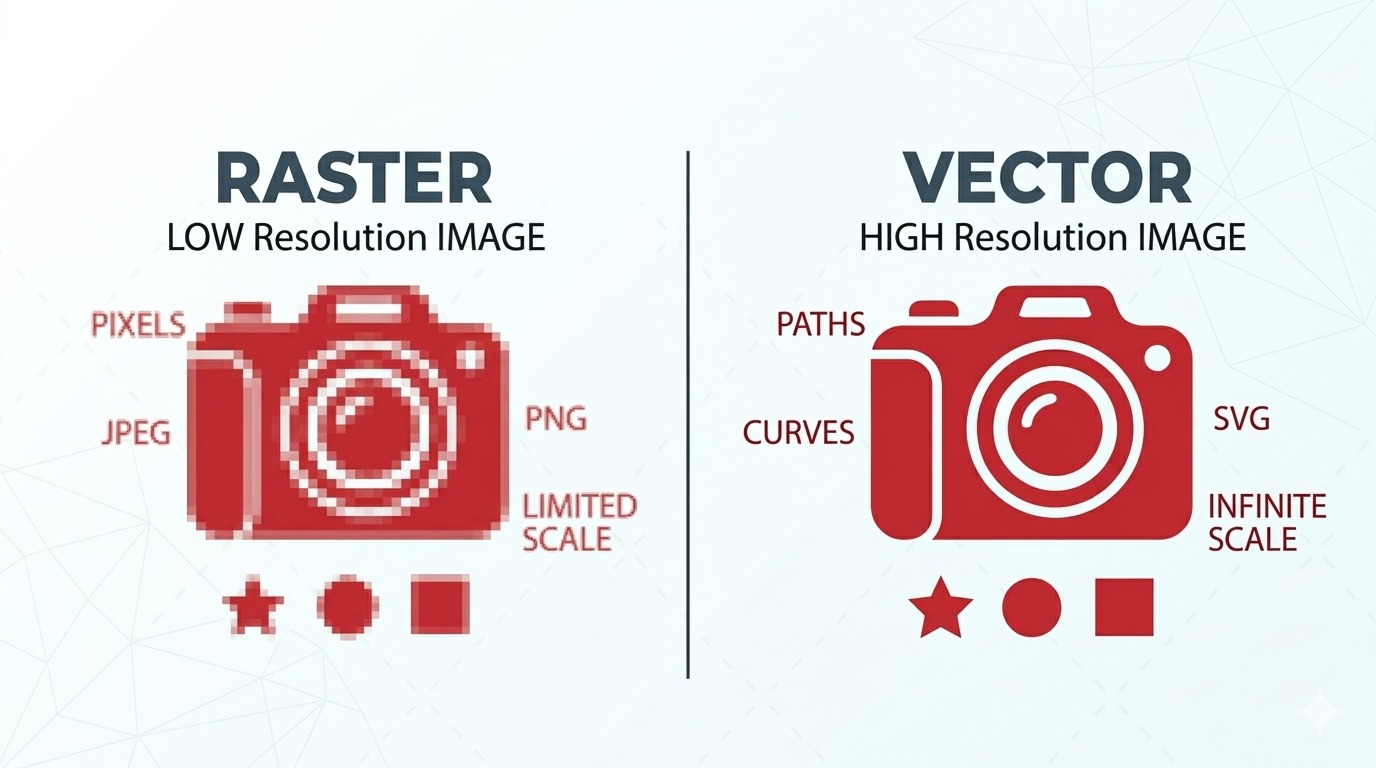
Most people first receive their logo as a JPG, PNG, or sometimes a PDF. These can be fine for quick use, but they often leave business owners wondering what is a vector logo and why they don't have one. Most standard files are raster formats, meaning the image is built from pixels.
Pixels have limits. When you enlarge a design without knowing what is vector format logo criteria, the pixels stretch, edges get jagged, and the whole mark looks less professional. To avoid this, you need to understand what is a vector file logo: it's a file that uses mathematical paths rather than pixels, ensuring your branding stays crisp at any size.
A vector file is different. It is built with mathematical paths instead of pixels, so it can scale infinitely. Your logo can be the size of a favicon or the size of a billboard, and it will still look crisp.
Common vector formats include AI, EPS, SVG, and sometimes vector PDF. Common raster formats include PNG, JPG, GIF, and most screenshots.
If you're looking to convert your logo into a vector format for better scalability and quality across various platforms and uses, consider reaching out to professionals who specialize in graphic design. You can contact us here for assistance with this process.
The real reason logos look “low quality” in print
This is where many brands get surprised. A logo that looks fine on a phone screen can fall apart when printed.
Why? Screens hide imperfections. Print exposes them.
Printing also requires higher resolution and often needs specific file types. A printer might ask for an EPS or AI file, or they may need a PDF that is truly vector. If you only have a PNG, you might end up with fuzzy edges, weird outlines, or inconsistent colors.
If you have ever experienced any of these, it is a strong sign you need a vector version:
- Your logo becomes blurry when enlarged
- You can see pixelated edges around letters or icons
- Your printer asks for AI/EPS/SVG and you do not have them
- You logo looks different on different backgrounds
- You cannot edit the text or shapes cleanly
You get perfect scalability for every use case
This is the most obvious answer to what is one advantage of using vector graphics?, and also the most valuable long-term.
Once your logo is vector, you can use it everywhere without worrying about size. That includes tiny applications like browser favicons and app icons, and huge ones like trade show banners, storefront signs, and vehicle wraps.
A vector logo is what makes brand consistency possible across all of these touchpoints. Instead of having five slightly different versions floating around your team, you have one clean source that works for everything.
Moreover, having a vector logo can greatly enhance the quality of prints on various materials, including t-shirts. For instance, when creating all-over t-shirt prints, using a vector logo ensures that the design retains its quality and sharpness regardless of the size or placement on the fabric.
Vector files make printing easier (and cheaper)
Printers love vector files because they are predictable. They do not have to guess what you meant, rebuild your art, or warn you about low resolution. That means fewer delays, fewer back-and-forth emails, and fewer surprise costs.
Even when a printer agrees to “work with” a raster logo, you are often paying indirectly. The print shop may charge a redraw fee, or you may end up reprinting because the result looked poor. A one-time vector conversion often saves money quickly if you do any real-world marketing.
Cleaner embroidery, engraving, and cutting
This is a big one that many people only learn after they order merch.
Embroidery machines, laser engravers, and vinyl cutters work best when the artwork is clean and precise. Raster logos can introduce messy edges or artifacts that turn into stitching problems, rough cuts, or uneven engraving.
Vector artwork gives those machines the crisp lines they need. If you plan to put your logo on hats, uniforms, mugs, metal signs, bottles, or packaging, vector is not just “nice to have.” It is often the difference between a product that looks premium and one that looks cheap.
Easy edits without quality loss
Need a small change like adjusting spacing, refining a shape, or updating a tagline? With a vector logo, those edits are clean and controlled.
With a raster logo, edits are a headache. Designers often have to trace it manually, rebuild the typography, or patch pixels, and it still may not look perfect.
A good vector file lets you:
- Update colors and create brand variations (light, dark, one-color)
- Export to any format your team needs
- Adjust proportions and alignment precisely
- Keep everything consistent across campaigns
It supports modern digital branding (especially SVG)
If you care about a fast, clean website, certain vector logo formats help there too. SVG is one of these formats built for the web, and it often loads faster than large PNG files while staying razor sharp on every screen.
SVG logos also look great on high-resolution displays, and they scale neatly inside responsive designs. This is one of those behind-the-scenes upgrades that makes your brand feel more polished without you needing to do anything extra afterward.
Protect your brand from “random versions” floating around
Here is a scenario we see all the time: someone downloads the logo from a website header, someone else pulls it from an old email signature, another person uses a low-res file from WhatsApp, and suddenly your brand looks inconsistent because no one is using the original source file for logo assets.
The solution is having a proper logo package, and the foundation of that package is your vector master.
When you own your vector logo, you can create a simple shared folder with official exports: PNGs for general use, SVG for web, EPS for printers, and PDF for documents. That one step removes a lot of friction inside a team.
Vector conversion is not the same as auto-tracing
A quick warning, because it matters: not all “vector conversions” are equal.
There are tools that auto-trace a PNG and generate a vector file, but when you look at how to make a logo in vector format correctly, the automated output is often messy. You might get too many anchor points, uneven curves, wobbly edges, and shapes that do not match the original logo cleanly. It may technically be a vector, but it is not a professional one.
A proper vector conversion involves careful rebuilding, clean geometry, and accurate typography. When done right, it is smooth, minimal, and production-ready. This is especially important if your logo includes fine lines, gradients, or custom letterforms.
When should you convert your logo to vector?
If you are running a business and asking yourself, “do I need a vector file for my logo?” the honest answer is: as early as possible.
But here are the moments when it becomes urgent:
- You are about to print anything, especially in large format.
- You are ordering merchandise.
- You are working with a new printer or sign shop.
- You are building a website or app and want crisp scaling.
- You are rebranding or refining brand assets.
- You want to protect consistency as your team grows.
If any of those apply, getting your logo into vector form is one of the smartest, simplest upgrades you can make.
What you should ask for after conversion (the “complete logo package”)
A vector file is the core, but you will get the most value when you also have properly exported versions for daily use. When understanding the difference between a source file vs vector file, a well-prepared package typically includes:
- AI or EPS (editable vector master for designers and print)
- SVG (best for web and responsive use)
- PDF (vector-friendly for documents and sharing)
- PNG (transparent background for general use)
- JPG (for quick previews, when transparency is not needed)
- Color variations (full color, black, white, one-color)
This makes your logo usable by anyone, even if they are not a designer.
It’s important to understand the different types of logo files available. For instance, this guide on logo file types provides valuable insights into their uses and benefits.
A quick note about us (and why we care about this)
At RS Graphic Design, we have worked with brands worldwide since 2017. Our clientele ranges from early-stage startups to established companies that need professional, production-ready assets. We are a full-service global graphic design agency, and a big part of what we do is ensuring your design is not just attractive, but also technically correct for real-world use.
Vector work is one of those areas where precision matters. A logo is not truly “finished” until it performs everywhere your brand shows up.
FAQs
1) What is the main benefit of converting a logo to a vector file?
A vector logo stays sharp at any size because it is built with paths, not pixels. It is ideal for printing, signage, and web use where you need clean edges and consistency.
2) Which vector formats should I ask for?
Ask for AI or EPS as the editable master, plus SVG for web and a vector PDF for sharing with printers. These cover most professional design and production workflows.
3) Can I convert a PNG or JPG logo into a vector?
Yes, but quality depends on how it is converted. Auto-tracing often creates messy shapes. A professional redraw rebuilds the logo cleanly, preserving smooth curves and accurate typography.
4) Will a vector file fix a poorly designed logo?
It will fix resolution and scalability issues, but it will not automatically improve weak design choices. If the original logo has problems, consider refining it during the vector redraw process.
5) Do I need a vector logo if I only use it online?
It is still worth it. SVG vectors look crisp on all screens, scale perfectly in responsive layouts, and often load faster than large raster images, improving brand presentation and performance.
Ready to get a clean, print-ready vector version of your logo?
If your logo is blurry, pixelated, or hard to use across print and digital, we can help you fix it properly. At RS Graphic Design, we convert and redraw logos with precision so you get a true vector master plus all the formats you actually need. Send us your current logo, tell us where you plan to use it, and we will prepare a professional vector package that keeps your brand looking sharp everywhere.